6 Ways Fixed-Height Cards Can Break Your Layout
When you first place fixed-height cards into a grid, everything looks pristine—titles align, excerpts fit, and the design seems bulletproof. But this visual stability hides a fragile foundation. As soon as content changes—through translations, user font adjustments, or editorial updates—the whole layout can crack. Designers and developers often overlook these pitfalls until it's too late. Here are six critical truths about fixed-height cards that reveal just how brittle they really are, and why you should think twice before locking those heights.
1. The False Promise of Perfect Alignment
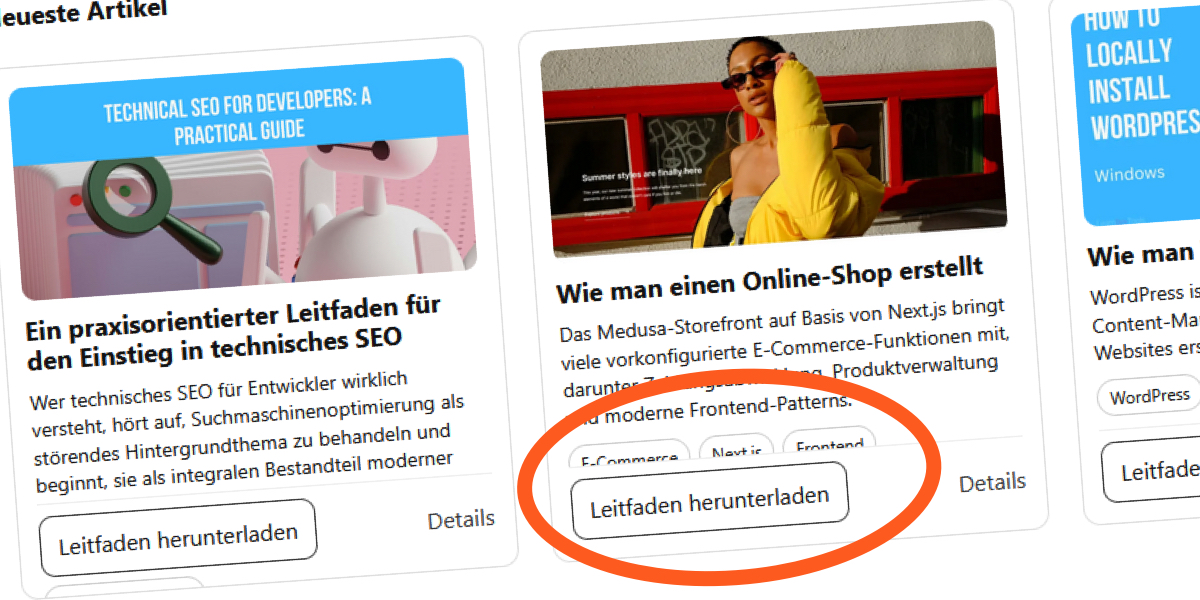
In the design mockup, every card shares identical pixel dimensions, creating a clean, orderly rhythm. The titles are short, excerpts are trimmed, and the grid looks uniform. Designers often trust this symmetry as a sign of stability. But that order relies on a hidden assumption: that content will always stay within those fixed boundaries. In reality, any variation—a longer headline, a different language, or even a slightly larger font—breaks the harmony. The moment you set a height, you freeze the container, and the natural relationship between content and box disappears. What looked like a robust solution becomes a ticking time bomb, waiting for the next content update to expose its weakness.
2. Translations Expand Text Beyond Expectations
English words tend to be compact, but many languages—like French, German, or Russian—use longer phrases. A two-line English title might stretch to three lines in German, pushing content beyond the fixed card height. The original design for a "Recent Articles" section assumed short English titles, so everything fit comfortably. But when the team translated the blog into French, the cards began to bulge. German translations made things even worse, forcing text to overflow or get clipped. The fixed height that worked for one language becomes a rigid cage for others. If you support multiple locales, fixed-height cards guarantee trouble. Unless you test every language variant, you're designing under a fragile monolingual assumption.
3. User Font Size Changes Crush Your Layout
Many users increase their browser’s default font size to reduce eye strain, especially those with low vision or digital fatigue. When they do, every text block inside a fixed-height card grows—titles, excerpts, and metadata—but the container stays the same. The result: elements start competing for the same space. The card’s title might invade the excerpt area, or the excerpt gets completely cut off. In the original implementation, setting overflow: hidden on the card simply masked this conflict. Without it, the failure becomes obvious: text overflows, overlaps, or disappears. Fixed-height layouts ignore user preferences, sacrificing accessibility for the sake of visual uniformity. A truly robust design should adapt, not lock itself into rigid dimensions.
4. The Hidden Danger of Line Clamping
To enforce text limits, many developers use CSS -webkit-line-clamp along with a fixed height. This combination sets a maximum number of lines and hides overflow. But line clamping works only when the container has no fixed height—it truncates based on the line box, not the container. When you also set a fixed height, the two constraints fight each other. The browser resolves the conflict by either clipping the clamped text further or allowing overflow. In the article example, the title used -webkit-line-clamp: 2 with a fixed card height. As font size increased, the clamped lines still grew, but the container didn’t, leading to cut-off content or unexpected gaps. The clamp becomes redundant—or worse, it introduces a false sense of control while hiding real issues.

5. Overflow Hidden Masks the Real Problem
When fixed-height cards overflow, the easiest fix is applying overflow: hidden. Instantly, the messy overhang disappears, and the grid looks tidy again. But this is a band-aid, not a solution. The content is still overflowing—it's just invisible. Users miss essential text, images may be cropped, and interactive elements can become unreachable. In the original demonstration, removing overflow: hidden revealed cards where titles and excerpts overlapped, breaking readability. This hidden overflow also affects accessibility: screen readers may still announce hidden content, confusing users, or they may skip it entirely. Relying on overflow hidden turns a visual problem into a content problem. The layout appears stable, but the user experience is degraded for many visitors.
6. Fixed Height Breaks the Natural Flow of Content
Block elements ordinarily expand to fit their content. This fluidity is a core principle of responsive design. But when you assign a fixed height, you sever that connection. The browser no longer adjusts the box size; it simply fits the content into a rigid space. If the content exceeds the height, it either overflows or gets clipped. This breaks the cardinal rule of layout: the container should accommodate the content, not the other way around. The initial design may look clean, but it ignores the dynamic nature of real-world content—edits, translations, user preferences, and viewport changes. A flexible alternative—like using min-height or relying on intrinsic sizing—preserves visual consistency while allowing content room to breathe.
Fixed-height cards may seem like a convenient shortcut for uniform grids, but they come at a steep cost: fragility. Each of these six points reveals how easily a single content shift can unravel the entire layout. Designers and developers should consider adopting flexible heights, using min-height instead of a fixed value, and testing with realistic content variations—including translations and larger fonts. By embracing fluidity, you create layouts that are truly robust, not just visually aligned.
Related Articles
- Navigating the Clicks Communicator Shipping Timeline: A Comprehensive Guide for Reservation Holders
- Microsoft Releases Emergency Patch for ASP.NET Core Vulnerability on Linux and macOS – Immediate Action Required
- Overcoming Gradient Descent Oscillations with Momentum
- Apple Pushes Out Final Betas for watchOS 26.5, tvOS 26.5, and visionOS 26.5 Ahead of Public Release
- 5 Essential Insights on Evolving Beyond Bots vs. Humans Detection
- Mastering Direct Examination: Lessons from a High-Profile Courtroom Blunder
- 10 Key Insights into Building an Interactive Merkle Tree Visualizer
- 10 Key Insights Into DeepSeek's Meteoric Rise and $45 Billion Valuation